Pages

Showing posts with label Plasma. Show all posts

Tuesday, 19 February 2013

How do I improve the sound on my TV?


Modern TVs sound rubbish.
We're happy to be up-front about this & if asked, most TV manufacturers would probably agree. There simply is no space for a decent set of speakers inside today's TVs, they are too thin and have very little frame to accommodate them. To make matters worse it's our own fault. The buying public, have over the last few years, swayed towards the most compact frames & thinnest sets available. This is therefore the trend the manufacturers have followed, resulting in worse & worse sound quality.
Click here to find in out more detail why new TVs have poor sound.


Getting better sound for your viewing experience is a relatively easy upgrade & there are various ways you can achieve it. Some options will run into thousands of pounds while others could only be a tenner.
A SoundBar could be the ideal
 solution for your audio woes.

The most common options include:
  • A full HiFi separates Home-Cinema system (5.1 or upwards)
  • An all-in-one Home-Cinema system (5.1)
  • An all-in-one Home-Cinema system (2.1)
  • A SoundBar, 2.1 audio system or Pedestal
  • Using existing HiFi equipment
The big question is which option suits your needs best?


HiFi separates Home-Cinema system (5.1 or upwards)
A HiFi separates Home-Cinema system is the premium solution for your TVs sound quality problem. Available from various different manufacturers and in a massive range of prices, these systems can provide stunning sound quality with huge amounts of volume, making them ideal for the larger listening area or for those wanting the best sound quality. Options available on this type of set up include up to & over 9.1 surround sound (nine speakers around the room plus one sub-woofer) with 200 watts of power per speaker.  As the items that make up these systems are made by HiFi manufacturers you also have the benefit of being able to play music at high quality too. This could mean that instead of having a Hifi & a Home-Cinema, you'd listen to everything through just the Home-Cinema.
This type of system does, however, have downsides, these being the level of complexity it will add to your system, the choices you need to make when buying it & the amount of room they generally take up.

For a full HiFi separates Home-Cinema system you'll need at least these 3 items.

A HiFi separates Home-Cinema consists of your choice of speakers, your choice of AV receiver/amplifier & normally your choice Blu-ray player (your existing Blu-ray or DVD will connect in if you want to continue using it). Because of these choices, this type of system has become less common in the average living room but still offers the best sound. A system like this will probably start from a minimum of £700 for reasonably good quality brands but can easily run in to thousands. Even from our range, which does not reach the very top end, we can supply just the receiver/amplifiers for over £2000. The flexibility in being able to mix-&-match different makes with each other is often very appealing because it allows you to get exactly what you want without compromise.
Another advantage of buying separates is that you are also able to change components as & when you want or need to. This means that if your Blu-ray stops working you can simply replace it & carry on using the rest of the system as normal. We have customers using the amplifier & speakers that were supplied over ten years ago with their brand new HD TV & Blu-ray player. The amp' may not be bang up-to-date but still provides great quality surround sound.


All-in-One Home-Cinema systems (5.1)
All-in-One Home-Cinema systems have been the most popular way for people to improve there sound quality for the last eight or nine years. Coming in at significantly lower prices than the HiFi separates & with less choice to make, they have found their way into many people living rooms. The reason they have been so popular is that they are easy to use, easy to setup and generally quite compact. They also have everything built-in to one unit. Blu-ray, DVD, CD, radio, iPod connections, amplifier & now Smart TV with music & video streaming services can all be included. This reduces the clutter, cabling & number of remote controls that seem to fill the modern living room.

All-in-One home cinema systems come with various speaker styles to match your needs & home decoration.
All-in-One 5.1 systems tend to come with a variety of different speaker sizes & although not with the same size of selection as HiFi separates, their should be an option suitable for your room.
  • Option 1 uses five very small speakers (the size of soup tins or smaller), paired with a small-ish sub-woofer. This is great if you need to place the speakers in awkward places or need them to be as discreet as possible. These tend to be the lower end of the all-in-one systems & are great for the smaller living room. The sound will still be much better than your TV's but you won't be able to drive them as hard as the more expensive options.
  • Option 2 generally offers more bass and more power allowing you to drive the system a little harder & really get into the explosions or car chases in your favorite action movie. This option will most likely also play your music back at a higher quality too. Because the speakers are slightly larger, positioning them may be slightly more tricky.
  • Option 3 will normally be very similar in performance to option 2 but has a very different impact on the positioning of the speakers. These are designed to sit on the floor & are quite large speakers to find space for. If you struggle for floor space or have children or pets, you may find they get knocked over or damaged because of their placement.

Despite their popularity, All-in-One kits do have their downsides.
  • Firstly, the sound quality tends to be fine for watching TV or films, but you are likely to find that music will feel a bit flat & like there's something missing that you can't quite put your finger on. If you're a fan of music, this might mean having to have a HiFi to play music on too.
  • Secondly, you can't upgrade them. For example, a few years ago Blu-ray was launched giving people access to HD movies. If you had an All-in-One system you needed to replace it all to be able to watch these discs. A couple of years later 3D Blu-ray came out & people had to change again.
  • Thirdly, but tied in to the above, faults are an issue. If the Blu-ray player stops working, you lose the whole kit while it's being repaired. If it can't be repaired you have to replace the whole thing.
As the price on these systems is significantly lower than HiFi separates many people accept that they might need to change them more often to keep them up-to-date.

Apart from the speakers, All-in-One Home Cinema systems take up very little space under your TV.


An all-in-one Home-Cinema system (2.1)
An all-in-one Home-Cinema system (2.1) works along exactly the same principles as it 5.1 sibling. The big difference here is that they are aimed at people that don't have room for 5.1 or people that simply don't want speakers all around the room. As desire for anyone purchasing this type of machine seems to be to minimise clutter, these systems generally have only the small-mid sized speakers. Quite often we see the speakers being placed next to the main unit on the stand under the TV. This wont give you the best stereo effect but will boost the sound quality significantly.

A 2.1 Home-Cinema system fantastic for the smaller room or to keep clutter to a minimum.

A SoundBar, 2.1 audio system or Pedestal
A SoundBar or 2.1 audio system is a very simple way to get better sound quality from your TV. These items are purely an audio booster. They don't play DVD or Blu-ray, don't have an iPod dock or radio, in fact they have nothing built-in at all. They plug directly in to your TV and let the sound (for whatever is being displayed on the screen) come through their speakers, giving you a much more impressive sound.

A SoundBar  is a horizontal speaker that sits either in-front of your TV on the TV stand or hangs on the wall underneath your TV. They come in a couple of different sizes to compliment the variety of different TV screen sizes that are available.

A 2.1 system is just 2 small speakers & a sub-woofer connected to the TV in the same way as a SoundBar. 
Some SoundBars are multi-purpose and will split in the middle to form a 2.1 system. This give you a bit more flexibility in positioning your speakers in the room.

The picture on the right shows a Panasonic SCHTB550 in both SoundBar & 2.1 layouts.


A Pedestal design is something relatively new to market & sits directly underneath your TV, on top of your TV stand. The only one we have seen so far is the Bose Solo. This type of design is probably the most compact of all the options.

With the Bose Solo there is no sub-woofer, which means even less cabling, nor do you have to find space to put speakers. Instead the Solo sits in the same footprint as your TV & raises it by approximately 70mm (3") but for most people this should create no problem at all.

The sound quality is big jump compared your TV but bay not be as heavy on the bass when compared to a 2.1 or SoundBar system.


Using existing HiFi equipment
This is possibly the quickest and easiest way to improve your TVs sound & is something I've been doing at home for years. Most decent TVs have had audio outputs hidden away somewhere on the rear or side panels. Historically they have been red & white RCA (phono) connectors and have "Audio out", "Line out" or an audio out symbol, most HiFi's have corresponding "Aux in", "Audio in" or "Line in" sockets of the same design. If you connect these together using a stereo RCA (phono) cable you can use you HiFi to handle the sound from your TV. Ideally you should have a speaker either side of your TV, but many people are happy just to have better sound, regardless of the speaker positions.

The stereo RCA (Phono) connections and the cable that plugs into (left) and the newer Digital Optical Audio output socket & associated cable that is found on most new TVs (right)
Some newer TVs may no longer have the RCA (Phono) connections. If this is the case, the chances are your TV will have a Digital Optical Audio output instead. This does the same job, but with a higher quality digital signal capable of transferring stereo & 5.1 surround sound. Your HiFi would also need to have a Digital Audio input for this type of connection.

Come in & see us!

Hopefully this blog will have given you ideas or encouragement to improve your TVs sound. If it has & you would like our help to get you up & running, please give us a call on 01793 537971 or visit us in-store where we are more than happy to answer your questions and demonstrate the various option for you.


To see our range of SoundBars, Home-Cinemas & 2.1 systems, please visit our website
www.HickmansOldTown.com or come & visit us in store.

You can also keep up to date with our offers & promotions through www.facebook.com/HickmansOldTownLtd
or @HickmansOldTown on twitter.

Monday, 18 February 2013

Why don't new TVs sound very good?


TVs have probably changed more in the last 15 years than at any time since 1967 when colour transmissions started on BBC2. In this relatively short period of time we have seen huge improvements in almost all aspects of using a TV. These advances include the following :
  • Square (4:3) shaped screens have changed to widescreen (16:9).
  • Inefficient analogue signals have given way to the new digital ones.
  • We had seen the introduction of HD broadcasting.
  • Ceefax & Teletext have been replaced by interactive services such as BBCi
  • We can now use our TVs to watch iPlayer or other on demand services instead of recording.
  • TV's can now let you access Skype, twitter or Facebook as social networking gets ever popular.
  • Trudging to the rental store has all but gone as we stream movies via broadband instead. 
  • 32" screen sizes are now considered small. 15 years ago, 36" was as big as you could get.
  • TVs in bedrooms for children was still considered a luxury instead of a standard fitting.
  • Mounting a TV on the wall was a feet of structural engineering and only really happened in pubs or hotels to keep them out of reach of the public.
All these improvements have been fantastic for the consumer & made using a TV more enjoyable than ever before. There has however been been one big casualty through this period. Sound quality.

Old fashioned CRT TVs
15 years ago, TVs were huge, not by screen size, but by sheer bulk. Larger TVs could be almost 2ft (600mm) deep & often had 4-6 inches (100-150mm) of plastic frame around the edge of the screen. A lot of this bulk was unavoidable & simply dictated by the size of the Cathode Ray Tube (CRT) technology that was used to produce the picture.

The up-side for this bulk was that speakers could be placed in less conventional positions. They were often placed behind the CRT itself with ports directing the sound out of grills at the front.

We also saw TVs that had sub-woofers on top of the CRT, sometimes inside the main casing, or inside an additional clip on unit. They were out of sight when watching the TV but added valuable depth to the sound quality.

The beauty behind this was that the designers didn't have to worry too much about the audio, they could fairly easily provide a quality of sound that all but the most critical viewer would happily accept.


The early flat-panel TVs

The early generations of flat-panel TVs didn't fare too badly with their sound quality. At the start, manufacturers overcame the space limitations by placing speakers at the side of the screens, at the bottom of the screens and by placing smaller bass speakers behind the screens.

Even so, the depth of these new TVs was a revelation compared to the old CRT sets and even this Panasonic from 2006, with a depth of 6 inches (150mm) was considered slim. The manufacturers were not adding depth to the sets to incorporate these speakers. They were simply fitting the speakers in around the vast amount of boards, heat-sinks & other components that were needed for the TVs to work.

By 2005, manufacturers had started to realise that the design of the TV was becoming almost as important as the picture & sound quality. The picture below shows how much the design of a 32" LCD from Panasonic changed from one range to the next. The later TV offered much sleeker lines and far less frame around the screen. The obvious speakers on the earlier set have been replaced with hidden speakers on the newer design but are still found either side of the TV screen.


Today's flat panel TVs

The trend for TVs to become more streamlined has continued & been made easier as components have got smaller allowing  more of then to be squeezed on to each circuit board. As this trend continued and further advancements such as LED back-lighting appeared, more pressure was put on the space needed to accommodate a decent set of speakers. At this point different manufacturers approached the design of their TVs differently, some sacrificed the size of the speakers to suit the styling of the TV, others sacrificed the styling in the pursuit of better sound. Fairly quickly it became obvious that the more stylish TVs were preferred by the consumer & if required extras speakers could solve the sound problem.

The picture above gives you an idea how far the casing around a Plasma TV has shrunk between 2004 & 2012. The later TV does have speakers built in, but watching anything other than a soap opera or the news may leave you feeling disappointed. You certainly wouldn't, by choice, want to watch the Proms or an action film as there would be many aspects of the audio missing from your experience.


The images above show a top-end 32" from 2006 compared with a mid-range 32" from 2012. It's quite clear how much smaller the newer TV is. The photo in the middle shows a speaker taken from an older LCD lined up next to a new set. The new set is almost half the depth of the speaker & graphically shows the reason why newer TVs have such poor sound reproduction, there is simply no room to do it.

It's a conspiracy!

We've had quite a few people coming in to our store saying that the poor sound quality is all part of a conspiracy from the manufacturers to make us buy additional equipment so we can enjoy TV. I can see where this idea has come from a consumers perspective but highly doubt that this is the case. One of the reasons I doubt this is because the degradation of sound quality has been a slow and continual process. If Panasonic, Sony or Samsung wanted to force people to buy home-cinema systems they would simply take the speakers out completely or would have jumped from the reasonable quality found in 2004 straight to today's standards for the 2005 range. They didn't do this & have been developing speakers ever since to try and maintain as much sound quality as possible. Unfortunately they are fighting an uphill battle against styling and consumer preference.

To see our range of products that will help improve the sound quality of your TV please visit our web site www.HickmansOldTown.com

Or for our blog about improving the sound quality of your TV 
please click here!

Thursday, 12 April 2012

Plasma or LCD/LED TV?


One of the questions we get asked most in the shop is "what's better? Plasma or LCD".  It's also one of the more difficult questions for us to answer. More recently the queries have also included LED's (full name LED LCD's) which apart from the method of illumination are essentially the same as traditional LCD TV's.
The Panasonic 42" VT30, recently awarded What HiFi's TV of the Year prize .
I have always been a big fan of Plasma TV's. I say this now as a reminder to myself to try and remove bias from this blog and also as a pointer for you towards my personal preference. I have also always had a general disliking of LCD pictures. This is probably a historic view and is based on the original LCD and Plasma TV's that first hit the domestic market 10+ years ago. At that time the picture quality difference between Plasma & LCD TV was massive.
The Plasma screens, whilst hugely expensive, were designed as TV's/Video displays from the outset & did produce good pictures. They were also viewable from anywhere in the room which suited peoples normal viewing habits. Slightly later, LCD's arrived on the shelves and were no where near in comparison. They could not be viewed from the sides, below or above and could not keep up with even the slowest football game without smearing the image. This said people did slowly start to buy the LCD's, possibly convinced by the slim design or their desirability, but this did allow the manufacturers to develop the product and improve on the obvious flaws in the design. Over the years LCD's have improved massively and removed most of the flaws from their original design, and now for most peoples needs, are an excellent option to replace the old CRT (tube) TV.

An early Panasonic 32" LCD 

Since LCD's have become the mass market screen of choice Plasma has almost become the forgotten technology to the general public. This is probably due to the fact that Plasma TV's are only available in larger screen sizes (42" & above) and as such are greatly outsold by LCD.  These are able to be used in anything from your mobile phone to a 60"+ screen. The improvement in Plasma TV's during the last 10 years may not have been as large or as obvious as that of LCD's, but they did have a big head start and in my view are still ahead in terms of pure picture performance.

The differences between Plasma & LCD/LED screens for me mainly fall into three areas. This obviously does not cover the many differences in the design and construction, but more the final results on the screen.
  1. Black Levels
  2. Brightness/Vividness
  3. Motion Smearing/Pixel response time
Area 1:
Black levels on TV's seems like an odd thing to consider when you're going out to buy one, but they do play a critical role in picture quality. Having a darker level of black on the screen means that colours can also be richer and more accurate. It also means that those dark and moody horror films are all the more engrossing as the monsters appear from the inky black backgrounds. Plasma TV's have always excelled in this area and despite big strides by their counterpart will more than likely always have the edge. If you looking for a set with a more natural picture and are going to be watching TV in a normally lit room a Plasma is going to be a good solution.

This picture shows 6 TVs all displaying the same black image. The  3 Plasma TVs are clearly distinguishable as the pictures are far nearer to pure black than the 3 LED/LCD TVs

Area 2:
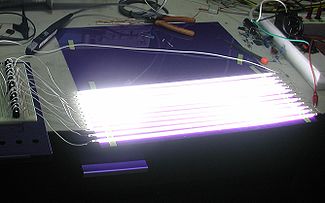
Picture brightness is an area where LCD's really can excel, even more so with the latest generation LED versions. LCD's are illuminated in a few different ways, either from behind with a  number of CCFL's or a matrix of LED's, although this is still uncommon and relatively expensive. LED's generally are placed at the edge with their light diffused across the back of the screen. This is the most common type of LED TV and has the advantage of also being very thin. Because they are illuminated they can be driven harder to produce a brighter picture. This obviously has a big advantage when placing the TV in a either a very brightly lit room or one that has lots of windows and natural light. Because of this additional brightness the colours tend to be very vivid (although potentially very unnatural in my opinion) and will suit some peoples tastes more than a Plasma TV. They also tend to be more suited for use as large screen PC monitors or in some ways for use with games consoles. Historically LCD's have also tended to suffer from less reflection on screen, however some newer sets now have a glossy finish that mimics the glass screen on a Plasma TV, these seem reflect more light than the older versions.

A naked CCFL back lighting array 
This picture shows 6 TVs all displaying the same white image. The  3 LED/LCD TVs are clearly distinguishable as the pictures are far brighter than the 3 Plasma TVs

This picture shows 6 TVs all displaying the same white rectangle on black background image.
In this shot you can see that the brightness on each of the LED/LCDs has fallen and is nearer to the levels found on the Plasma screens. The black areas are still however nowhere near those on the Plasma TVs

Area 3:
Motion Smearing and Pixel Response time has historically been very different between the two screen types. LCD's firstly became popular in the computer market where the desire to have laptops and also space saving desktop displays became apparent. For these roles the poor pixel response time and motion smearing were not of particular concern. At the time PC's did not really require the super quick response times that people expected from their TV screens, except perhaps for the hardcore gamers who would have stuck with their larger but generally better suited CRT monitors. This however did not stop the development within the industry to improve these issues with LCD screens. As the response times came down the idea of using them as TV screens became more attractive. LCD's now offer images that, in general perform extremely well under most circumstances and have a level of smearing that most people can happily accept when watching TV.
They do, however, have a long way to go to catch up with Plasma TV's. A modern LCD has a response just under 2 milliseconds, compared with the old CRT's of under 1ms and Plasma TV's at .001ms. The quicker response time not only makes Plasma TV's better at handling quick motion but also more suited to high quality 3D images. Plasma's can also be  better for gaming where details during fast moving scenes need to be sharp and clear.

Additional but less critical differences between the two technologies include Power Consumption, Screen Burn and Viewing Angles.

Power Consumption is a thorny subject at the moment and will probably only get worse over time as we all become more environmentally concious and concerned about our spending. LCD's, and in particular those using LED lighting, are the most energy efficient amongst these three technologies. Plasma's do use more power but not as much as you may think when reading the labels on the back of the sets. Some current Panasonic sets highlight this for me. The 42" LED's rated power is 102watts but during average use will use about 70watts. This compares with the 42" Plasma (which is higher up in the range and also 3D) that has a rated power of 325watts but drops down to 130watts during average use. If you prefer the picture on a Plasma TV, the minimal extra running cost should be outweighed by your enjoyment of set.

Screen Burn can be an issue on both types of screen, but has generally been more common on Plasma displays. On most new sets, when used for everyday TV viewing, screen burn is almost a thing of the past. There is still the chance of screen burn if the sets are used in a manner contrary to their design. These sets are designed to display moving images and although they will display photos or static graphics, it is not their main purpose. If you do leave a static image on screen for long periods you can permanently damage the picture. A static image could also include the speedo' or health bar from your favourite game or the DOG that certain TV stations are determined to plaster over your favourite show. An example of a bad DOG below shows the Disney channel logo in the bottom left of the screen. This logo is very bright and is a solid colour. This will quite quickly start to burn into a Plasma screen if left unchecked. DOG's such as the BBC three logo below will not burn in because they are low intensity and also semi translucent.


Lastly Viewing Angles. Generally the issue that LCD's had with very poor angles has, on the vast majority of decent sets, ceased to be a problem. The picture will still lose brightness as you go off centre but even at 70-80 degrees they are now perfectly viewable. Smaller LCD's and lower priced models will still suffer from this issue, in some cases severely.

At this point I would also like to point out that there are some rumours that have persisted over the years about Plasma's. These include "don't Plasma's have to be re-gassed?", "I've been told that I have to occasionally turn Plasma's upside down to re-distribute the gas" & "if a Plasma screen breaks will I need to mop up the plasma as it leaks out". These and other rumours have been muttered to us many times over the years and we really don't know the exact source of them. Needless to say however they are all completely false and baseless. A Plasma or LCD TV needs no special attention at all other than the right cleaning materials. 


In Conclusion

If you have no particular requirement our advice is quite simple. 
Choose the set that you think has the best picture.
At home you'll have nothing to compare it to, and will be delighted with the set. 
If anyone tells you 100% categorically that one is better than the other, they probably have an agenda for doing so.

To see our range of Plasma & LCD/LED TVs, please visit our website
www.HickmansOldTown.com or come & visit us in store.

You can also keep up to date with our offers & promotions through www.facebook.com/HickmansOldTownLtd
or @HickmansOldTown on twitter.